
September 23, 2011
Tips for New Bloggers
Editor’s Note: Rebecca is one of the bloggers we’ve featured on Blogs of Note. After she was Noted, Rebecca received many new followers and emails asking her about her tips for blogging, so she’s graciously written up this blog post for anyone looking for tips on how to get started.
 Hi everyone! I'm Rebecca Brown, a blogger and personal stylist in the Seattle area. When I started my blog nearly 2 years ago, it was to document my attempt to wear a different dress for every day of December (sounds super interesting, right? It proves you can write a blog about anything).
I had no idea that a blog about my clothing choices would grow and become such a fun hobby! And even though I’ve been blogging for a little while, I still feel like I have so much to learn, which is what keeps blogging interesting! So, while I'm definitely far from being an expert, here are a few things that have worked for me:
1) Find a community of bloggers with similar interests. Do you like to write about video games, fashion, cooking? There are lots of great blogs on those topics already. A quick Google search for “fashion blogs” helped me round out my reading list. I always check out the blog rolls of people whose blogs I enjoy, and I also visit the blogs of folks who comment on my blog. Bottom line: interact with bloggers whose blogs you enjoy. You'll learn so much, I promise. This leads me to my next point...
2) Leave insightful comments on blogs that you enjoy - especially blogs that are in the same niche as you. Instead of just saying, "hey, nice blog, follow me please”, call out something specific that you liked about the post. Pure "followback" requests don’t really make people want to follow you.
3) Don't underestimate the importance of good pictures on your posts. The basics: Use a tripod or get a friend to photograph you if the pictures are of you. Take pictures outdoors if possible because natural light always makes pictures look better. Use post-processing (I use Picnik) to adjust the exposure, add effects, and crop to keep the focus on what you want. You don’t need a fancy camera - I use my cell phone most of the time! I wrote about this in more depth here.
4) Think about quality, rather than quantity of posts. Readers would rather see an insightful (and spell-checked!) post with original content and good pictures 2-4 times a week than hastily-written thoughts on a daily basis. Most avid blog readers follow so many blogs that if you post too often, and especially if your posts aren't high quality, you'll get passed over in favor of the other blogs on their blogroll. Plus, a great, high-quality post can continue to get you traffic for a few days - don't truncate its effectiveness by posting again the very next day.
5) Schedule your posts. I typically have a chunk of time on the weekend where I can plan out and write my 2-4 posts for the week, or at least get a rough draft in place. Blogger allows you to schedule your posts and they will automatically publish at the date/time you specify. I typically set my posts to publish around 2am to capture folks in other time zones.
6) Lastly, don't apologize for not posting more often. A blog is a fun hobby - but once you start feeling beholden to it, it stops being fun! Plus, your readers will likely not notice if you don't post for a week unless you write a post about how sorry you are for not posting!
There are so many great resources out there for bloggers looking to hone their craft. Here are a few of my favorites: - 10 Things About Your Blog That Drive Me Crazy (via B at Beautifully Invisible) - Don't Be A Savage Blogger (Jamillah via Beautifully Invisible): - Build a Better Blog (via Vahni at Grit and Glamour).
I hope these tips are helpful! Blogging has been such a great part of my life - allowing me to express myself, build a community and make lifelong friends. And the great thing about it is that nearly anyone can do it. So have fun with it, don’t take yourself too seriously, and you’ll be a great blogger in no time!
I had no idea that a blog about my clothing choices would grow and become such a fun hobby! And even though I’ve been blogging for a little while, I still feel like I have so much to learn, which is what keeps blogging interesting! So, while I'm definitely far from being an expert, here are a few things that have worked for me:
1) Find a community of bloggers with similar interests. Do you like to write about video games, fashion, cooking? There are lots of great blogs on those topics already. A quick Google search for “fashion blogs” helped me round out my reading list. I always check out the blog rolls of people whose blogs I enjoy, and I also visit the blogs of folks who comment on my blog. Bottom line: interact with bloggers whose blogs you enjoy. You'll learn so much, I promise. This leads me to my next point...
2) Leave insightful comments on blogs that you enjoy - especially blogs that are in the same niche as you. Instead of just saying, "hey, nice blog, follow me please”, call out something specific that you liked about the post. Pure "followback" requests don’t really make people want to follow you.
3) Don't underestimate the importance of good pictures on your posts. The basics: Use a tripod or get a friend to photograph you if the pictures are of you. Take pictures outdoors if possible because natural light always makes pictures look better. Use post-processing (I use Picnik) to adjust the exposure, add effects, and crop to keep the focus on what you want. You don’t need a fancy camera - I use my cell phone most of the time! I wrote about this in more depth here.
4) Think about quality, rather than quantity of posts. Readers would rather see an insightful (and spell-checked!) post with original content and good pictures 2-4 times a week than hastily-written thoughts on a daily basis. Most avid blog readers follow so many blogs that if you post too often, and especially if your posts aren't high quality, you'll get passed over in favor of the other blogs on their blogroll. Plus, a great, high-quality post can continue to get you traffic for a few days - don't truncate its effectiveness by posting again the very next day.
5) Schedule your posts. I typically have a chunk of time on the weekend where I can plan out and write my 2-4 posts for the week, or at least get a rough draft in place. Blogger allows you to schedule your posts and they will automatically publish at the date/time you specify. I typically set my posts to publish around 2am to capture folks in other time zones.
6) Lastly, don't apologize for not posting more often. A blog is a fun hobby - but once you start feeling beholden to it, it stops being fun! Plus, your readers will likely not notice if you don't post for a week unless you write a post about how sorry you are for not posting!
There are so many great resources out there for bloggers looking to hone their craft. Here are a few of my favorites: - 10 Things About Your Blog That Drive Me Crazy (via B at Beautifully Invisible) - Don't Be A Savage Blogger (Jamillah via Beautifully Invisible): - Build a Better Blog (via Vahni at Grit and Glamour).
I hope these tips are helpful! Blogging has been such a great part of my life - allowing me to express myself, build a community and make lifelong friends. And the great thing about it is that nearly anyone can do it. So have fun with it, don’t take yourself too seriously, and you’ll be a great blogger in no time!
September 19, 2011
Your images never looked so good
Posted by Marcos Almeida, Software Engineer
Updated 09/21/11: After listening to your feedback we've decided to roll back and make improvements to the Lightbox feature. We will update this blog as soon as the feature relaunches.
Introducing Lightbox, the latest in a series of Blogger updates aimed at giving you an improved and modernized blogging experience. Lightbox is a whole new way to interact with photos. When clicked, images now expand into a shiny new overlay that displays them at their full size for optimal viewing.
Once an image is opened in the lightbox view, any other images from the same post will now appear as thumbnails along the bottom, which can be easily browsed by clicking the arrow keys on the left or right side of the lightbox.
This feature is automatically enabled for all blogs, which means you can see the lightbox view in action right now by clicking one of the images below.



If you’ve custom-coded your image HTML so that images function as hyperlinks, then the lightbox view will not display and your original image hyperlink will work as expected.
Your images never looked so good!
Updated 09/21/11: After listening to your feedback we've decided to roll back and make improvements to the Lightbox feature. We will update this blog as soon as the feature relaunches.
Introducing Lightbox, the latest in a series of Blogger updates aimed at giving you an improved and modernized blogging experience. Lightbox is a whole new way to interact with photos. When clicked, images now expand into a shiny new overlay that displays them at their full size for optimal viewing.
Once an image is opened in the lightbox view, any other images from the same post will now appear as thumbnails along the bottom, which can be easily browsed by clicking the arrow keys on the left or right side of the lightbox.
This feature is automatically enabled for all blogs, which means you can see the lightbox view in action right now by clicking one of the images below.
(Creative Commons photos taken from http://www.fotopedia.com/)
If you’ve custom-coded your image HTML so that images function as hyperlinks, then the lightbox view will not display and your original image hyperlink will work as expected.
Your images never looked so good!
September 08, 2011
Announcing the Blogger app for iOS
Today we’re excited to announce the new Blogger app for iOS. With the Blogger app, you can write a new blog post and publish it immediately or save it as a draft right from your iOS device. You can also open a blog post you've been working on from your computer and continue editing it while you're on-the-go. Your blog posts are automatically synced across devices, so you’ll always have access to the latest version.
Pictures are worth a thousand words, and the Blogger app makes it easy to add photos either by choosing from the gallery or taking a new photo right within the app. You can also add labels and location to provide more details about the post.


Download the Blogger app today for iOS versions 3.2 and above in the App Store. Although the user interface is only available in English at this time, the app supports blog posts written in all languages. If you’re using an Android-powered device, you can download the Blogger app for Android from the Android Market.
Posted by Chang Kim, Product Manager
Pictures are worth a thousand words, and the Blogger app makes it easy to add photos either by choosing from the gallery or taking a new photo right within the app. You can also add labels and location to provide more details about the post.


Posted by Chang Kim, Product Manager
August 31, 2011
Blogger’s fresh new look
Posted by: Chang Kim, Product Manager
As you may have heard, things are starting to look a little different across many Google products—and today, Blogger is the next product to get a makeover.
It’s been a few years since we made major updates to Blogger’s look and feel, and there’s a lot more to these changes than just shiny new graphics. We’ve rewritten the entire editing and management experience from scratch so it’s faster and more efficient for you—and easier for us to update and improve over time.
Throughout the design process, we conducted user interviews to help identify how to make Blogger even easier and more enjoyable to use. We also watched users try our new interface and made many refinements based on their feedback.
A streamlined blogging experience
Whether you’re on a dashboard or settings page of blogger.com, you can always create or edit posts with just one click at the top of the screen. Additionally, the post editor has been expanded and simplified to give you a larger canvas for drafting and previewing your work.
 Monitor and grow your audience at a glance
In the new “Overview” section of your dashboard, you’ll be able to quickly get a pulse for how people are reacting to your blog with a graph of your most recent traffic numbers, comment activity and follower counts. For extra guidance and inspiration, you’ll also find a list of helpful links, a feed of Blogger updates and a showcase of other blogs you may find interesting.
 Opt in now
Starting today, we’ll gradually let all bloggers choose to turn on the new UI, so your Blogger experience won’t be updated until you enable it. Over the next few days, keep an eye out for a pop-up announcement on your dashboard with instructions on how to get started, and check out this Blogger Help Center page to learn more about what’s changed.
If you have suggestions or feedback about the new look, click the gear icon in the top right of the navigation bar and select “Send Feedback.”
We’re working hard to fundamentally revamp and improve the Blogger experience from the ground up, and we hope you enjoy the first in a series of major updates that are on their way in the coming months.
As you may have heard, things are starting to look a little different across many Google products—and today, Blogger is the next product to get a makeover.
It’s been a few years since we made major updates to Blogger’s look and feel, and there’s a lot more to these changes than just shiny new graphics. We’ve rewritten the entire editing and management experience from scratch so it’s faster and more efficient for you—and easier for us to update and improve over time.
Throughout the design process, we conducted user interviews to help identify how to make Blogger even easier and more enjoyable to use. We also watched users try our new interface and made many refinements based on their feedback.
A streamlined blogging experience
Whether you’re on a dashboard or settings page of blogger.com, you can always create or edit posts with just one click at the top of the screen. Additionally, the post editor has been expanded and simplified to give you a larger canvas for drafting and previewing your work.

In the new “Overview” section of your dashboard, you’ll be able to quickly get a pulse for how people are reacting to your blog with a graph of your most recent traffic numbers, comment activity and follower counts. For extra guidance and inspiration, you’ll also find a list of helpful links, a feed of Blogger updates and a showcase of other blogs you may find interesting.

Starting today, we’ll gradually let all bloggers choose to turn on the new UI, so your Blogger experience won’t be updated until you enable it. Over the next few days, keep an eye out for a pop-up announcement on your dashboard with instructions on how to get started, and check out this Blogger Help Center page to learn more about what’s changed.
If you have suggestions or feedback about the new look, click the gear icon in the top right of the navigation bar and select “Send Feedback.”
We’re working hard to fundamentally revamp and improve the Blogger experience from the ground up, and we hope you enjoy the first in a series of major updates that are on their way in the coming months.
August 01, 2011
Latest updates, August 1st
Posted by Brett Wiltshire, Product Operations

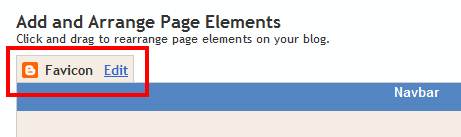
Since the initial release to Draft, we’ve added support for all image types (JPEG, PNG, GIF, etc) and will now automatically resize the image to the correct favicon specifications. You can add a custom favicon to your blog right now on the Design | Page Elements tab, via the new favicon element shown below:
Swipe navigation for Mobile views

If you are viewing this post from a mobile device, you can give this a try right now!
Support for +1 on Pages
A few weeks ago we announced the +1 button on Blogger, and now we’re happy to expand coverage to individual pages as well as blog posts. The +1 button will now appear on Pages as an option on the sharing widget just as it has appeared for individual blog posts.

That’s it for now, more to come soon! Happy Blogging.
Hello Bloggers!
Over the last few days we’ve rolled out a handful of updates, all of which are available to everyone right now. Here’s the rundown:
Favicon graduates from Draft
Over the last few days we’ve rolled out a handful of updates, all of which are available to everyone right now. Here’s the rundown:
Favicon graduates from Draft
As we announced on the Blogger in Draft blog earlier this month, we now offer an easy tool for creating custom favicons on your Blogger blog. We’re happy to announce today that this feature is now available to all Blogger users.
Since the initial release to Draft, we’ve added support for all image types (JPEG, PNG, GIF, etc) and will now automatically resize the image to the correct favicon specifications. You can add a custom favicon to your blog right now on the Design | Page Elements tab, via the new favicon element shown below:
Swipe navigation for Mobile views
Adding to the featureset of our new mobile templates, you can now navigate through your mobile view with swipe navigation. This new navigation option lets you swipe through individual blog posts in a way that should feel very familiar for mobile and tablet users.
Support for +1 on Pages
A few weeks ago we announced the +1 button on Blogger, and now we’re happy to expand coverage to individual pages as well as blog posts. The +1 button will now appear on Pages as an option on the sharing widget just as it has appeared for individual blog posts.
That’s it for now, more to come soon! Happy Blogging.
July 28, 2011
You can do some amazing things with Blogger
Guest post by David Kutcher
Editor’s note: We invited David Kutcher, an innovative web developer from Northampton MA, to write a guest blog post to share how he uses Blogger to create robust, beautiful and easy to use websites for his clients.
Hi, my name is David Kutcher. I own Confluent Forms LLC, a graphic design and custom web-based software development firm in Northampton, MA. We specialize in creating gorgeous and engaging websites with custom content management systems. As curious as it made sound, we’ve found that Blogger can be a great platform for web development when a custom CMS isn’t needed. Blogger provides a ton of functionality and design freedom for our clients, and not just for blogs!
You’re probably thinking: “what? using blog software for a website?”. I know - it sounds a bit unconventional, but it’s true.

I think that most users do not realize the value and flexibility that Blogger offers, including free hosting, complete customization, personalized domain options, WYSIWYG editor and more. Because Blogger is a Google product, you can also easily integrate with other Google services such as: Google Analytics, Google Docs, AdSense, Picasa and more. All of this is available free of charge while providing a simple, easy authoring environment for the small business owner.
As a web development firm, Blogger provides us with a different value proposition. When we pitch a Blogger-based solution to a client we can provide services at a lower price point while still maintaining full creative freedom. I don’t need to set up a paid hosting account for my client, worry about security patches or upgrades, or be concerned about system uptime and availability. Finally, I can easily transfer ownership and management of the site to my client, or, continue to keep us both as co-administrators.
It can be hard to envision a platform’s potential from a list of features so here are a few examples of what we’ve achieved with Blogger.
I hope the examples above have opened your eyes to some of the possibilities of what you can do with your Blogger site, or maybe encourage you to give Blogger a try for your website solution. A longer, more in-depth version of this post is available on our blog. My company is lucky to have an exceptionally talented designer that isn’t afraid to push us, but even if you don’t have the ability to create an entirely new site template, perhaps this will encourage you to explore the underlying code of your site and to customize some of the small details to match your vision for your site.
Happy designing and coding!
David
Editor’s note: We invited David Kutcher, an innovative web developer from Northampton MA, to write a guest blog post to share how he uses Blogger to create robust, beautiful and easy to use websites for his clients.
Hi, my name is David Kutcher. I own Confluent Forms LLC, a graphic design and custom web-based software development firm in Northampton, MA. We specialize in creating gorgeous and engaging websites with custom content management systems. As curious as it made sound, we’ve found that Blogger can be a great platform for web development when a custom CMS isn’t needed. Blogger provides a ton of functionality and design freedom for our clients, and not just for blogs!
You’re probably thinking: “what? using blog software for a website?”. I know - it sounds a bit unconventional, but it’s true.
I think that most users do not realize the value and flexibility that Blogger offers, including free hosting, complete customization, personalized domain options, WYSIWYG editor and more. Because Blogger is a Google product, you can also easily integrate with other Google services such as: Google Analytics, Google Docs, AdSense, Picasa and more. All of this is available free of charge while providing a simple, easy authoring environment for the small business owner.
As a web development firm, Blogger provides us with a different value proposition. When we pitch a Blogger-based solution to a client we can provide services at a lower price point while still maintaining full creative freedom. I don’t need to set up a paid hosting account for my client, worry about security patches or upgrades, or be concerned about system uptime and availability. Finally, I can easily transfer ownership and management of the site to my client, or, continue to keep us both as co-administrators.
It can be hard to envision a platform’s potential from a list of features so here are a few examples of what we’ve achieved with Blogger.
- 360 Hilton St. Louis at the Ballpark
- Pinch Gallery
- Renew Pilates Studio
- Impish
- Ode Boutique
- Elbow Room Coffee Company
I hope the examples above have opened your eyes to some of the possibilities of what you can do with your Blogger site, or maybe encourage you to give Blogger a try for your website solution. A longer, more in-depth version of this post is available on our blog. My company is lucky to have an exceptionally talented designer that isn’t afraid to push us, but even if you don’t have the ability to create an entirely new site template, perhaps this will encourage you to explore the underlying code of your site and to customize some of the small details to match your vision for your site.
Happy designing and coding!
David
July 25, 2011
New tools for handling copyright on Blogger
Posted by Brett Wiltshire, Product Operations
In keeping with Google’s public commitment to make copyright work better online, our team has been working on improving the copyright environment for bloggers and copyright owners alike. As access to the web grows, bringing new content and services online, it becomes even more important to ensure the rights of everyone involved are protected and understood. To that end, we’re happy today to announce the release of two significant improvements to Blogger’s copyright handling toolkit:
1.) Streamlined submission tools for rightsholders.
In addition, to ensure transparency around the entire system, we’ll continue to forward all DMCA notices (as well as counter-notices) to the Chilling Effects cease & desist clearinghouse where they’ll be available for public searching.
As a refresher, here is a recap of how our DMCA removals procedure works today, factoring in these two updates we’ve just announced:
1.) Streamlined submission tools for rightsholders.
Working alongside industry representatives, we’ve built a better submission and handling system for our high-volume DMCA takedown submitters that simplifies the reporting process and reduces our average response time to less than 24 hours.
2.) Streamlined counter-notice tools for users.
2.) Streamlined counter-notice tools for users.
Built right into the dashboard, Blogger now offers a simple way to counter-notify incoming DMCA takedown notices to blog authors who believe their content was improperly targeted for removal. This will initially be available for users receiving notices from our high-volume submitters, though we have plans to expand this to other notices down the road.
In addition, to ensure transparency around the entire system, we’ll continue to forward all DMCA notices (as well as counter-notices) to the Chilling Effects cease & desist clearinghouse where they’ll be available for public searching.
As a refresher, here is a recap of how our DMCA removals procedure works today, factoring in these two updates we’ve just announced:
- A blogger (let’s call him Joe Blogger) decides to post a link on his blog to a downloadable copy of Album X.
- The rightsholder believes the link leads to an unauthorized, infringing copy of Album X and submits a takedown notice for that specific post.
- The DMCA takedown notice is processed by the Blogger Team, and if determined to be a valid complaint, the post in question is reverted to draft, Joe Blogger is notified, and a copy of the complaint is sent to Chilling Effects.
- At this point, Joe Blogger has the right to file a counter-notice and request the post be restored if he believes the takedown was improper. He may also edit the post to remove the allegedly infringing content himself.
- If Joe Blogger files a counter-notice, notification will be sent to the rightsholder as well as to Chilling Effects, and after ten business days the post will be restored if the rightsholder decides not to pursue further action.
- Rightsholders may pursue further legal action if they deem the counter-notice sent by the user to be invalid or erroneous.
July 21, 2011
Creator vs. Curator
Post by Lisa Ding, Community Manager
Of the blogs that I read every day, more than half are blogs that link me to news articles, websites, or other blog posts on the web. It used to be that bloggers were expected to write original content. While original content remains highly valued by many readers, it's no longer taboo to simply share things that you find elsewhere on the Internet. Followers will read your blog to see the great content that you surface. Essentially, every blog can be a small gallery of a blogger’s interests and taste.
One of my go-to blogs for Internet trends is Brandflakes for Breakfast, which states its mission is to “read the internet, so you don’t have to.” The posts are short and quippy, and the contributors work for a digital creative agency, so I trust the content that they’re surfacing will be relevant to the Internet, marketing, and branding -- some topics that interest me.

While I’m a fervent reader of blogs, I’ve struggled to post original content on a regular basis. Fortunately, I’ve discovered a couple of sharing tools on Blogger that will help me post more often. As long as I keep finding interesting things on the web, I’ll be able to use these two shortcuts to help me generate quick blog posts:
Of the blogs that I read every day, more than half are blogs that link me to news articles, websites, or other blog posts on the web. It used to be that bloggers were expected to write original content. While original content remains highly valued by many readers, it's no longer taboo to simply share things that you find elsewhere on the Internet. Followers will read your blog to see the great content that you surface. Essentially, every blog can be a small gallery of a blogger’s interests and taste.
One of my go-to blogs for Internet trends is Brandflakes for Breakfast, which states its mission is to “read the internet, so you don’t have to.” The posts are short and quippy, and the contributors work for a digital creative agency, so I trust the content that they’re surfacing will be relevant to the Internet, marketing, and branding -- some topics that interest me.

While I’m a fervent reader of blogs, I’ve struggled to post original content on a regular basis. Fortunately, I’ve discovered a couple of sharing tools on Blogger that will help me post more often. As long as I keep finding interesting things on the web, I’ll be able to use these two shortcuts to help me generate quick blog posts:
- Blog This! tool for Chrome: If you're using Chrome as your browser, simply install this extension and you'll be ready to write a blog post with a prepopulated link.
- If you want to share a post from another Blogger blog, select the ‘B’ sharing button at the end of the post. A link and blurb of the post will pre-populate, so simply type an intro, and voila! you have a new post. (Note: If you don't see the sharing buttons on your own blog, you can enable them by going into the Design tab and editing the Blog Post page element.)
July 15, 2011
Why do you blog?
Posted by Inci Atrek, User Education Specialist
Hi Bloggers,
Hi Bloggers,
At the beginning, life can seem a bit lonely in the blogosphere, so kudos to you for taking that first step and starting a blog. Whether your purpose has evolved over the years or you’ve stuck around for the same reasons that got you started, we truly enjoyed reading your responses to our #bloggerasks tweet on why you blog.
@CprincessUK broke it down in list form, music blogger @LinerNotes crafted a mission statement, and @fortnow blogged about blogging for Blogger’s 10th anniversary. Others of you kept your raison d’être under 140 characters. Here are a few of them, short and sweet:
“I started blogging because I loved my wedding and talking about weddings and my fiancé didn't - I needed a community” (@CMatlick)
“Main reason: creative writing outlet. Aux reasons: counteract stereotypes/preconceived ideas abt Pakistan, Pakistanis, & Islam :)” (@desigurrl)
“I started blogging after a near death experience to create a legacy for my three young children” (@FrillyHills)
“Started blogging to write about food and Flavor of Italy's culinary tourism business” (@FlavorofItaly)
Whether it’s your love of magic, to share tips on shaving, to chronicle life with the kids, or for reasons you still haven’t figured out, we want to know -- why do you blog?
@CprincessUK broke it down in list form, music blogger @LinerNotes crafted a mission statement, and @fortnow blogged about blogging for Blogger’s 10th anniversary. Others of you kept your raison d’être under 140 characters. Here are a few of them, short and sweet:
“I started blogging because I loved my wedding and talking about weddings and my fiancé didn't - I needed a community” (@CMatlick)
“Main reason: creative writing outlet. Aux reasons: counteract stereotypes/preconceived ideas abt Pakistan, Pakistanis, & Islam :)” (@desigurrl)
“I started blogging after a near death experience to create a legacy for my three young children” (@FrillyHills)
“Started blogging to write about food and Flavor of Italy's culinary tourism business” (@FlavorofItaly)
Whether it’s your love of magic, to share tips on shaving, to chronicle life with the kids, or for reasons you still haven’t figured out, we want to know -- why do you blog?
Cheers,
Inci
July 14, 2011
Update on Browser Support
Posted by Brett Wiltshire, Product Operations
For this reason, starting next month Blogger.com will only support modern browsers. Beginning August 1st, we’ll support the current and prior major release of Chrome, Firefox, Internet Explorer and Safari on a rolling basis. Each time a new version is released, we’ll begin supporting the update and stop supporting the third-oldest version.
As of August 1st, we will discontinue support for the following browsers and their predecessors: Firefox 3.5, Internet Explorer 7, and Safari 3. In these older browsers you may have trouble using certain features in Blogger as well as many other Google Apps such as Gmail, Google Calendar, Google Talk, Google Docs and Google Sites.
So if it’s been a while since your last update, we encourage you to take advantage of the improved performance and security these modern browsers have to offer by installing the latest version of your preferred browser. There are many to choose from:
As the world moves more to the web, these new browsers are more than just a modern convenience, they are a necessity for what the future holds.
Subscribe to: Posts (Atom)


Tidak ada komentar:
Posting Komentar